ATTENDING: Tom B, Bob S, Dottie E, Jerry L, Janet S and Bill N.
TOPIC : SPEED
Do you remember a time when you could order something by mail, but had
to allow for the obligatory 6 to 8 weeks for delivery? How could we ever
wait that long? Now the delay of a few seconds makes us tap our toe impatiently
and wonder what is wrong with the internet. At this meeting, we explored
various ways to make our Macs faster without great cost or technical
knowlege.
SOME WAYS TO SPEED UP YOUR MAC
1) RAM
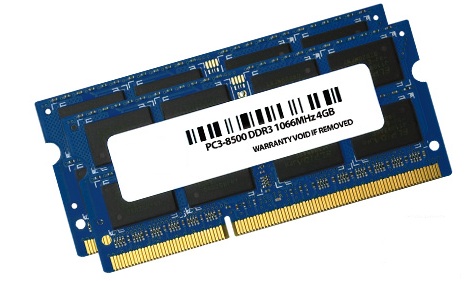
Max out the Random Access Memory - it is the cheapest investment you
can make to get more speed.
OWC (Other
World Computing) - reliable source for RAM memory - low prices, ships
fast - Tom recently purchased 8 GB of RAM (two 4GB cards) for $79 for
his 2010 MBPro - also shared that many MBPros have been tested to run
effectively with 16GB (see report
from OWC and specs from Everymac (NOTE:
it is necessary to run OSX 7.5 or higher along with with update of firmware EFI
and SMC).
View 'How to install RAM' tutorials and videos from OWC,
and iFixit for
your specific Mac.
2) RUN LEAN
Quit unnecessary Apps and Utilities - note the 'running lights' on active
Apps in the Dock - the Finder will always be ON.
Stick to one of each kind of background service such
as anti-virus, calendars, newsfeeds, etc. Anti-Virus apps are often a
big drag on speed.
One
great free anti-virus app is ClamXav - download directly
from developer (19.9MB) - OS10.5 or higher required. A slightly modified
version of ClamXav is available from the Mac
App Store.
What are the differences between the version of ClamXav available from
maker and the version in the Mac App Store?
The App Store version doesn't contain ClamXav Sentry, so it is not
able to watch your computer for new files and scan them as they arrive.
There is no engine installation phase as the App Store requirements
stipulate that everything must be self-contained within the app.
Virus definition updates are downloaded on a per-user basis.
Updates to the ClamXav app itself are taken care of via the Mac App
Store.
Mac OS X 10.6 or greater is required for App Store version - 10.5
and higher work
Speed up SAFARI
by changing some browser preferences (Safari > Preferences
> Security > Uncheck 'Plugins' (read more).
This will often help prevent the SPINNING BEACH BALL OF DEATH.
< -
- - this is not real but it's still annoying - read
more about the SBBOD.
Empty the image
Cache, Cookies, History and Trash once in awhile.
To empty Safari Cache, go to Safari>Empty Cache>Empty (note:
on Mt Lion, Cache is combined with Clear History)
To delete Cookies, go to Safari>Preferences>Privacy>Remove
All Website Data (or click Details to select specific Cookies)
To Clear History of visited sites, go to Safari>History>Clear
History
To Empty Trash, click and hold on Trash can>Empty Trash
Be
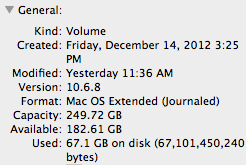
sure your HARD DRIVE is not getting too full. A minimum of 10% capacity
is required or it will get very sluggish and possibly crash. Click 'Get
Info' for HD or simply open a Finder window and read capacity remaining
at bottom.
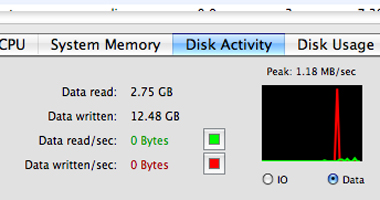
Check
the ACTIVITY MONITOR (COM-SHIFT-U) to find out which Apps and Processes
are the biggest hogs of your Mac's resources.
3) SHORTCUTS
Get there faster by using Keyboard commands to reduce mousing time
COM-SHIFT-A opens Applications Folder on your Mac
COM-SHIFT-U opens Utility Folder on your Mac
SPACEBAR in Browsing - moves page view down one screen
COM A - select all
COM S - save
COM C - copy
COM V - paste
COM [ (front bracket) - return to previous webpage
COM UP ARROW jump to top of browser page
COM DOWN ARROW jump to bottom of browser page
COM LEFT ARROW jump to previous browser page
COM RIGHT ARROW jump to next browser page
See complete list
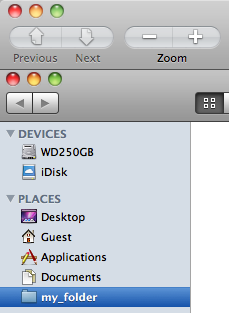
Create SHORTCUTS (aliases) to folders or files - drag & drop a folder,
file or app onto the Dock, sidebar of Finder window or top of Finder
window.
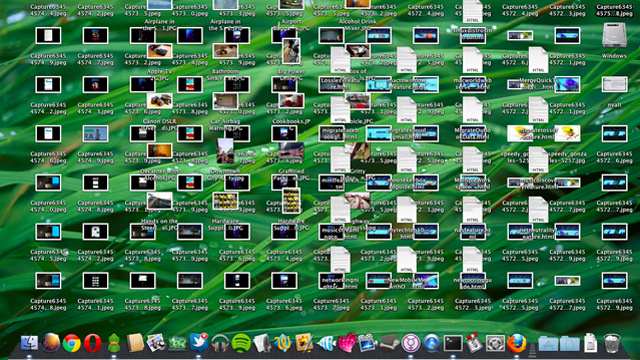
4) CUT THE CLUTTER
Have you ever tried walking briskly through a cluttered room?
Remove most files, folders, apps and dmg installers from the Desktop
Folder. Put them into Document Folders. Create Desktop aliases if you
need quick access. . Remember, it's the Desktop Folder that needs to
be kept cleaned out, not just the Desktop view. It may actually slow
down the user's efficiency more than the computer, but it still tends
to slow things down. Dmg files are not needed after the installation
is completed. They can be trashed or copied to a USB flash drive for
later use if needed.
Note: When
trashing files from a USB flashdrive or external drive of any kind, be
sure to Empty the Trash before ejecting the drive. This will free up
actual storage space on the external drive. You will see a change of
size noted at bottom of the disk window when done.
HELPFUL SOFTWARE
Pixelmator -
$14.99 at the Apple App Store (Free 30-day Trial) - download (40MB)
. Will Pixelmator replace Photoshop? Read Tidbits review.
ToyViewer -
free image-manipulating utility - Apple store preview of latest ToyViewer
5.3.0 for Lion and Mt. Lion - download (4.2MB)
- with high recommendations by Charles Moore- read his review -
older version ToyViewer 5.0 for Snow Leopard here -
the 'free rotation' tool is extremely handy.
HELPFUL WEBSITES
RoaringApps -
website showing application compatibility for OSX / iOS (Lion and Mt
Lion)
CBS Reporter's Computer
Breached Remotely - read
about it
WiFi in Your
Home Can Track Your Moves - new technology called WiSee - read
about it
3-D Printed Guns - blueprints
banned from internet after 100,000 downloads in two days - read
about it
Yahoo Mail - recently
there has been a rash of strange emails from friends which look genuine
except for the short cryptic web link enclosed in the e-mail, no other
message, and also the fact that they didn't send it. Read how
to stop possible Yahoo e-mail account hacking .
SAFEGUARD YOUR IDENTITY ONLINE
Free software available from MacUpdate helps you defend against any
form of network surveillance that threatens personal freedom and privacy,
confidential business activities and relationships, and state security
known as traffic analysis
Tor - download browser
from MacUpdate (33mb) - read more
about the Tor Project




 One
great free anti-virus app is ClamXav -
One
great free anti-virus app is ClamXav -  Speed up SAFARI
by changing some browser preferences (Safari > Preferences
> Security > Uncheck 'Plugins' (read
Speed up SAFARI
by changing some browser preferences (Safari > Preferences
> Security > Uncheck 'Plugins' (read  < -
- - this is not real but it's still annoying -
< -
- - this is not real but it's still annoying -  Empty the image
Cache, Cookies, History and Trash once in awhile.
Empty the image
Cache, Cookies, History and Trash once in awhile.






 CBS Reporter's Computer
Breached Remotely -
CBS Reporter's Computer
Breached Remotely -  WiFi in Your
Home Can Track Your Moves - new technology called WiSee -
WiFi in Your
Home Can Track Your Moves - new technology called WiSee - 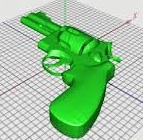 3-D Printed Guns - blueprints
banned from internet after 100,000 downloads in two days -
3-D Printed Guns - blueprints
banned from internet after 100,000 downloads in two days -  Yahoo Mail - recently
there has been a rash of strange emails from friends which look genuine
except for the short cryptic web link enclosed in the e-mail, no other
message, and also the fact that they didn't send it. Read
Yahoo Mail - recently
there has been a rash of strange emails from friends which look genuine
except for the short cryptic web link enclosed in the e-mail, no other
message, and also the fact that they didn't send it. Read  Tor -
Tor -  Anonym -
  JonDo -